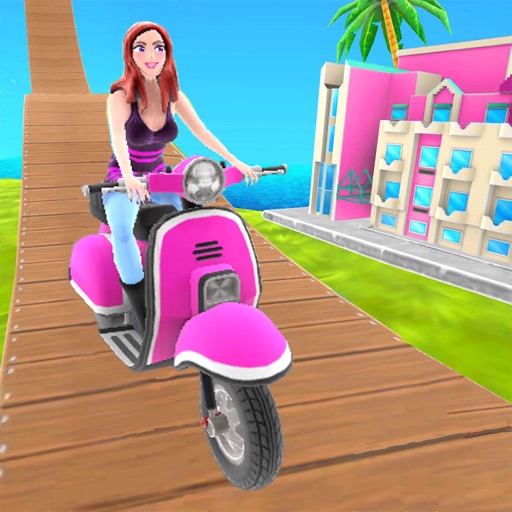
Download iOS IPA Hack
2
1
Views
0
This Week
5.0
Rating
6 years ago
Last Updated
Uphill Rush USA Racing iOS Hack
Compatibility:
iOS 9.0-26+
iPhone
iPad
No Jailbreak Required
Hack Features
- Unlimited coins. Get/spend some.
- Unlimited diamonds. Get/spend some.
- No ads.
- Unlocked all characters.
- Unlocked all vehicles.
App Information
- Hack Version: 4.3.17
- Developer: iOSAppHacks
- Bundle ID: com.spilgames.UphillRushNewYork
- IPA Size: 148.67 MB
- iOS Required: 9.0+
- Updated:
Official App Store Description US App Store
Try today the newest addition to the most addictive, visually stunning and critically- acclaimed racing games series - Uphill Rush.
Prepare yourself for the unforgettable ride and a real racing madness. It’s not yet another time killer that is easy to play and difficult to master. It’s the true unicorn among stunt, racing and sliding games; The ultimate bike blast, hovercraft sliding, car crashing and skateboard flipping experience that will kill time like no other game.
Are you a fan of extreme competition? If so, a Multiplayer mode will allow you to battle and blitz your opponents in the most vivid and exciting racing game. How quick can you conquer the leaderboard? Try the PvP mode and find out today.
Do you want to work on your skills and test your reflex? Then our new single player mode is the choice for you. Pick your challenge and progress as you master the game. This game will never get boring! Crash obstacles, flip as you perform your stunts, catch bonuses as you fly. Discover new adventures and become a legend of Uphill Rush Racing.
Explore completely new tracks taking you to the most exciting USA areas - Santa Monica Bay an NY City. Immerse yourself in this beautiful surroundings and enjoy the state of art graphic - a true rollercoaster for your senses. Mini racing, simple game, that will impress you with its beautiful 3D style.
Pimp your car, bike, skateboard, tank, unicorn and so much more. Become a legend of Uphill Rush leaderboard.
Upgrade both the style and abilities of your bike, hovercraft, motorbike and whatever you always dreamed to compete as… Superhero, unicorn? Name it, we have it!
Features:
- Discover two brand new beautiful worlds - New York city and Santa Monica Bay
- Battle , blitz and bash your opponents in the PvP (multiplayer) mode.
- Ghost racing enabled.
- Challenge yourself in the Single Player Mode. Test your reflex, agility and speed in this addictive mini racing game.
- Upgrade your bike, motorbike, FR, jet, car, skateboard, tanks, hovercraft and more.
- Strategize by optimizing your vehicle. Choose between speed strength and acceleration and begin the racing madness.
- Customise your look and show off your style.
- Master crazy stunts and unlock new bonuses
Don’t wait! Discover today brand new mini racing game from the creators of the legendary Uphill Rush Water Park Racing and Thrill Rush roller coaster racing.
Uphill Rush USA Racing is the combination of everything you love in racing games. Whether it’s FR, bike, skateboard or jet car stunts. Racing madness will never end in this most versatile and exciting mini racing game.
PRIVACY POLICY
http://www.spilgames.com/mobile-apps-privacy-policy/
TERMS OF USE
http://www.spilgames.com/terms-of-use/
Prepare yourself for the unforgettable ride and a real racing madness. It’s not yet another time killer that is easy to play and difficult to master. It’s the true unicorn among stunt, racing and sliding games; The ultimate bike blast, hovercraft sliding, car crashing and skateboard flipping experience that will kill time like no other game.
Are you a fan of extreme competition? If so, a Multiplayer mode will allow you to battle and blitz your opponents in the most vivid and exciting racing game. How quick can you conquer the leaderboard? Try the PvP mode and find out today.
Do you want to work on your skills and test your reflex? Then our new single player mode is the choice for you. Pick your challenge and progress as you master the game. This game will never get boring! Crash obstacles, flip as you perform your stunts, catch bonuses as you fly. Discover new adventures and become a legend of Uphill Rush Racing.
Explore completely new tracks taking you to the most exciting USA areas - Santa Monica Bay an NY City. Immerse yourself in this beautiful surroundings and enjoy the state of art graphic - a true rollercoaster for your senses. Mini racing, simple game, that will impress you with its beautiful 3D style.
Pimp your car, bike, skateboard, tank, unicorn and so much more. Become a legend of Uphill Rush leaderboard.
Upgrade both the style and abilities of your bike, hovercraft, motorbike and whatever you always dreamed to compete as… Superhero, unicorn? Name it, we have it!
Features:
- Discover two brand new beautiful worlds - New York city and Santa Monica Bay
- Battle , blitz and bash your opponents in the PvP (multiplayer) mode.
- Ghost racing enabled.
- Challenge yourself in the Single Player Mode. Test your reflex, agility and speed in this addictive mini racing game.
- Upgrade your bike, motorbike, FR, jet, car, skateboard, tanks, hovercraft and more.
- Strategize by optimizing your vehicle. Choose between speed strength and acceleration and begin the racing madness.
- Customise your look and show off your style.
- Master crazy stunts and unlock new bonuses
Don’t wait! Discover today brand new mini racing game from the creators of the legendary Uphill Rush Water Park Racing and Thrill Rush roller coaster racing.
Uphill Rush USA Racing is the combination of everything you love in racing games. Whether it’s FR, bike, skateboard or jet car stunts. Racing madness will never end in this most versatile and exciting mini racing game.
PRIVACY POLICY
http://www.spilgames.com/mobile-apps-privacy-policy/
TERMS OF USE
http://www.spilgames.com/terms-of-use/
- Rating: 4.6/5 (708 ratings)
- Price: Free
- App Store Category: Games
-
Languages:
EN
- Developer: Key Games Network B.V.
- App Store Link:
Installation Guide
Follow these steps to install Uphill Rush USA Racing on your iOS device using Sideloadly - the best iOS IPA sideloader for iPhone and iPad.
Prerequisites:
- A computer (Windows PC or Mac)
- Latest version of iTunes & iCloud installed
- An Apple ID (free or paid developer account)
- USB cable to connect your iOS device
- Internet connection
Step-by-Step Installation Guide:
-
Download Sideloadly:
Visit Sideloadly.io and download the application for your computer (Windows or Mac). -
Install Sideloadly:
Run the Sideloadly installer and follow the installation wizard. -
Download the IPA File:
Use the green download button above to get the Uphill Rush USA Racing IPA file (148.67 MB). -
Connect Your Device:
Use a USB cable to connect your iPhone or iPad to your computer. Trust the computer if prompted on your iOS device. -
Sideload the App:
- Open Sideloadly
- Drag and drop the downloaded IPA file into Sideloadly
- Select your connected iOS device
- Enter your Apple ID email and password when prompted
- Click "Start" to begin sideloading
-
Trust the Developer Profile:
- On your iOS device, go to Settings > General > VPN & Device Management
- Find your Apple ID profile under "Developer App"
- Tap on it and select "Trust"
-
Enable Developer Mode (If Required):
- If you see a prompt about Developer Mode, or the app doesn't open:
- Go to Settings > Privacy & Security
- Scroll down and tap "Developer Mode"
- Toggle Developer Mode on and follow the prompts to restart your device
- After restart, confirm enabling Developer Mode when prompted
Important Notes:
- Free Apple IDs require re-sideloading every 7 days
- Paid Apple Developer accounts ($99/year) allow installations lasting 365 days
- Make sure your iOS version is 9.0+ for compatibility
- Keep Sideloadly updated for the best sideloading experience
Troubleshooting:
- If installation fails, try rebooting your device and computer
- Ensure you have the latest iTunes & iCloud version installed
- Check your internet connection
- Make sure your Apple ID is valid and 2FA is handled if enabled
- If Developer Mode is not visible, make sure you're on iOS 16 or later and reboot device


