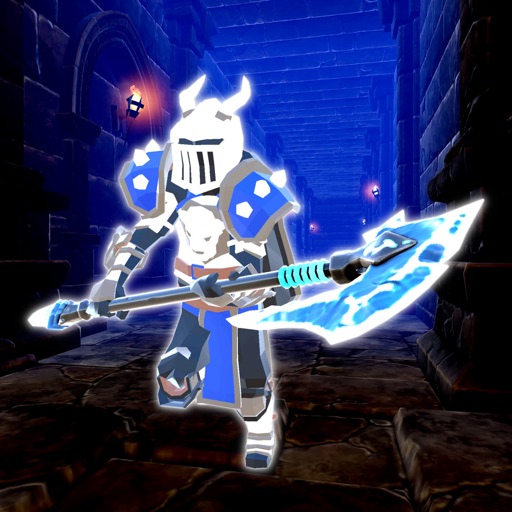
Download iOS IPA Hack
2
1
Views
0
This Week
5.0
Rating
8 months ago
Last Updated
Dungeon's Call: Into the Abyss iOS Hack
Compatibility:
iOS 12.0-26+
iPhone
iPad
No Jailbreak Required
Hack Features
- Damage Multiplier
- Defence Multiplier
- Unlimited Gold -> Will increase instead of decrease.
- Unlimited Gems -> Will increase instead of decrease.
App Information
- Hack Version: 1.0.7
- Developer: iOSAppHacks
- Bundle ID: com.seg-soft.dungeonscall
- IPA Size: 151.03 MB
- iOS Required: 12.0+
- Updated:
Official App Store Description US App Store
Dungeon's Call is a dynamic hack-and-slash RPG where you embark on adventures through randomly generated dungeons filled with formidable monsters.
Customize your character with a variety of skills and equipment to become the ultimate hero.
-- Dive into dangerous dungeons:
Each dungeon is uniquely generated, offering fresh challenges and rewards.
Defeat powerful enemies to upgrade your gear and level up.
-- Customize your hero:
Freely allocate skill points to create a character that's perfectly suited to your playstyle.
Experiment with different weapons and abilities to find the perfect build.
-- Upgrade your gear:
Forge powerful weapons and armor at the blacksmith, and enhance them with runes for even greater power.
-- Confront a myriad of monsters:
From ghostly apparitions to cunning sorcerers and colossal golems, a diverse array of creatures awaits.
Customize your character with a variety of skills and equipment to become the ultimate hero.
-- Dive into dangerous dungeons:
Each dungeon is uniquely generated, offering fresh challenges and rewards.
Defeat powerful enemies to upgrade your gear and level up.
-- Customize your hero:
Freely allocate skill points to create a character that's perfectly suited to your playstyle.
Experiment with different weapons and abilities to find the perfect build.
-- Upgrade your gear:
Forge powerful weapons and armor at the blacksmith, and enhance them with runes for even greater power.
-- Confront a myriad of monsters:
From ghostly apparitions to cunning sorcerers and colossal golems, a diverse array of creatures awaits.
- Rating: 4.5/5 (10 ratings)
- Price: Free
- App Store Category: Games
-
Languages:
EN JA KO ZH ZH
- Developer: Satoshi Masui
- App Store Link:
Installation Guide
Follow these steps to install Dungeon's Call: Into the Abyss on your iOS device using Sideloadly - the best iOS IPA sideloader for iPhone and iPad.
Prerequisites:
- A computer (Windows PC or Mac)
- Latest version of iTunes & iCloud installed
- An Apple ID (free or paid developer account)
- USB cable to connect your iOS device
- Internet connection
Step-by-Step Installation Guide:
-
Download Sideloadly:
Visit Sideloadly.io and download the application for your computer (Windows or Mac). -
Install Sideloadly:
Run the Sideloadly installer and follow the installation wizard. -
Download the IPA File:
Use the green download button above to get the Dungeon's Call: Into the Abyss IPA file (151.03 MB). -
Connect Your Device:
Use a USB cable to connect your iPhone or iPad to your computer. Trust the computer if prompted on your iOS device. -
Sideload the App:
- Open Sideloadly
- Drag and drop the downloaded IPA file into Sideloadly
- Select your connected iOS device
- Enter your Apple ID email and password when prompted
- Click "Start" to begin sideloading
-
Trust the Developer Profile:
- On your iOS device, go to Settings > General > VPN & Device Management
- Find your Apple ID profile under "Developer App"
- Tap on it and select "Trust"
-
Enable Developer Mode (If Required):
- If you see a prompt about Developer Mode, or the app doesn't open:
- Go to Settings > Privacy & Security
- Scroll down and tap "Developer Mode"
- Toggle Developer Mode on and follow the prompts to restart your device
- After restart, confirm enabling Developer Mode when prompted
Important Notes:
- Free Apple IDs require re-sideloading every 7 days
- Paid Apple Developer accounts ($99/year) allow installations lasting 365 days
- Make sure your iOS version is 12.0+ for compatibility
- Keep Sideloadly updated for the best sideloading experience
Troubleshooting:
- If installation fails, try rebooting your device and computer
- Ensure you have the latest iTunes & iCloud version installed
- Check your internet connection
- Make sure your Apple ID is valid and 2FA is handled if enabled
- If Developer Mode is not visible, make sure you're on iOS 16 or later and reboot device


