Download iOS IPA Hack
4
1
Views
0
This Week
5.0
Rating
8 months ago
Last Updated
Rumble Paws: Backpack Battle iOS Hack
Compatibility:
iOS 15.0-26+
iPhone
iPad
No Jailbreak Required
Hack Features
- ADS NO / Rewards Free
- Triple Speed Active
- Unlimited Gems
- Unlimited Coins
- Unlimited Energy
- Unlimited Fragment
- Unlimited Equip Items
- Unlimited Epic Keys
- Unlimited Golden Keys
- Unlimited Silver Keys
- Unlimited Battle Coins
App Information
- Hack Version: 1.00.02
- Developer: iOSAppHacks
- Bundle ID: com.bag.fight.backpack.critter.battle.rumble.paws
- IPA Size: 259.82 MB
- iOS Required: 15.0+
- Updated:
Official App Store Description US App Store
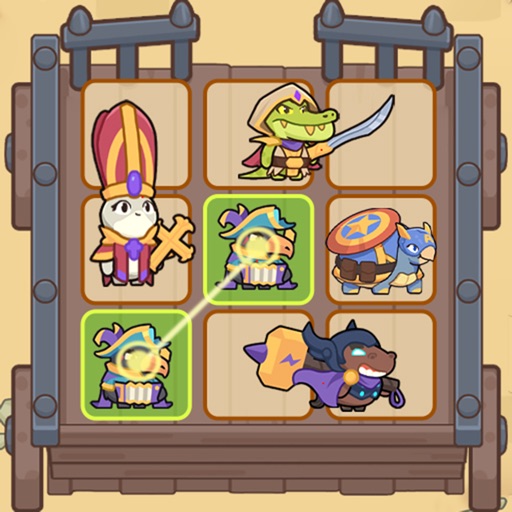
Love tactical thinking and casual merging? Rumble Paws is your perfect match. It's tailored for strategy lovers who enjoy thoughtful planning over quick reflexes, focusing on backpack management and merging adorable critters into powerful heroes for victory.
Here’s your path to becoming a master strategist:
Plan Your Way to Victory
- Think, Then Act: Outsmart enemies with clever decisions. Each battle rewards intelligent planning, letting you feel the satisfaction of a well-earned win.
- Merge & Manage Your Backpack: Combine adorable animals into stronger heroes and master your backpack's layout. Your organizational skills directly shape your success on the battlefield.
- Grow Your Strength: Experience steady progress as you upgrade heroes and discover powerful synergies. Your tactical genius expands with every victory.
Engage in Dynamic Battles
- Face Unique Challenges: Encounter unpredictable events and bosses that test your adaptability, ensuring no two playthroughs are the same.
- Master a Deep Tactical System: Enjoy a rich combat experience where positioning, timing, and resource management are key to victory.
Download Rumble Paws today! Prove your brilliance in a game where smart strategy leads to every triumph. Ready to command your heroes and fight for survival?
Subscription Agreement Notice:
1. Content:
For 30 days, get 3x Battle Speed plus a large amount of Diamonds.
2. Subscription duration: 1 month.
- Monthly subscription, no discount, $6.99.
3. Payment will be charged to your account at confirmation of purchase.
4. Subscriptions will automatically renew at the same price and duration as the original "Monthly" packages, unless auto-renew is turned off at least 24 hours in advance before the end of the current previous subscription period.
5. Free trial subscriptions will automatically renew unless canceled 24 hours before renewal.
6. The account will be automatically debited for the renewal of the selected subscription (weekly or monthly) within 24 hours before the end of the current subscription period.
7. Subscriptions may be managed by the user and auto-renewal may be turned off by going to the user's Account Settings after purchase. Please head to Settings - iTunes Store & App Store - Check Apple ID - Account Settings - Subscription.
Privacy Policy: https://www.viroplay.com/policy.html
Terms Of Use:https://www.viroplay.com/service.html
Here’s your path to becoming a master strategist:
Plan Your Way to Victory
- Think, Then Act: Outsmart enemies with clever decisions. Each battle rewards intelligent planning, letting you feel the satisfaction of a well-earned win.
- Merge & Manage Your Backpack: Combine adorable animals into stronger heroes and master your backpack's layout. Your organizational skills directly shape your success on the battlefield.
- Grow Your Strength: Experience steady progress as you upgrade heroes and discover powerful synergies. Your tactical genius expands with every victory.
Engage in Dynamic Battles
- Face Unique Challenges: Encounter unpredictable events and bosses that test your adaptability, ensuring no two playthroughs are the same.
- Master a Deep Tactical System: Enjoy a rich combat experience where positioning, timing, and resource management are key to victory.
Download Rumble Paws today! Prove your brilliance in a game where smart strategy leads to every triumph. Ready to command your heroes and fight for survival?
Subscription Agreement Notice:
1. Content:
For 30 days, get 3x Battle Speed plus a large amount of Diamonds.
2. Subscription duration: 1 month.
- Monthly subscription, no discount, $6.99.
3. Payment will be charged to your account at confirmation of purchase.
4. Subscriptions will automatically renew at the same price and duration as the original "Monthly" packages, unless auto-renew is turned off at least 24 hours in advance before the end of the current previous subscription period.
5. Free trial subscriptions will automatically renew unless canceled 24 hours before renewal.
6. The account will be automatically debited for the renewal of the selected subscription (weekly or monthly) within 24 hours before the end of the current subscription period.
7. Subscriptions may be managed by the user and auto-renewal may be turned off by going to the user's Account Settings after purchase. Please head to Settings - iTunes Store & App Store - Check Apple ID - Account Settings - Subscription.
Privacy Policy: https://www.viroplay.com/policy.html
Terms Of Use:https://www.viroplay.com/service.html
- Rating: 4.3/5 (202 ratings)
- Price: Free
- App Store Category: Games
-
Languages:
EN FR DE JA KO ZH ES ZH
- Developer: Viroplay., Ltd.
- App Store Link:
Installation Guide
Follow these steps to install Rumble Paws: Backpack Battle on your iOS device using Sideloadly - the best iOS IPA sideloader for iPhone and iPad.
Prerequisites:
- A computer (Windows PC or Mac)
- Latest version of iTunes & iCloud installed
- An Apple ID (free or paid developer account)
- USB cable to connect your iOS device
- Internet connection
Step-by-Step Installation Guide:
-
Download Sideloadly:
Visit Sideloadly.io and download the application for your computer (Windows or Mac). -
Install Sideloadly:
Run the Sideloadly installer and follow the installation wizard. -
Download the IPA File:
Use the green download button above to get the Rumble Paws: Backpack Battle IPA file (259.82 MB). -
Connect Your Device:
Use a USB cable to connect your iPhone or iPad to your computer. Trust the computer if prompted on your iOS device. -
Sideload the App:
- Open Sideloadly
- Drag and drop the downloaded IPA file into Sideloadly
- Select your connected iOS device
- Enter your Apple ID email and password when prompted
- Click "Start" to begin sideloading
-
Trust the Developer Profile:
- On your iOS device, go to Settings > General > VPN & Device Management
- Find your Apple ID profile under "Developer App"
- Tap on it and select "Trust"
-
Enable Developer Mode (If Required):
- If you see a prompt about Developer Mode, or the app doesn't open:
- Go to Settings > Privacy & Security
- Scroll down and tap "Developer Mode"
- Toggle Developer Mode on and follow the prompts to restart your device
- After restart, confirm enabling Developer Mode when prompted
Important Notes:
- Free Apple IDs require re-sideloading every 7 days
- Paid Apple Developer accounts ($99/year) allow installations lasting 365 days
- Make sure your iOS version is 15.0+ for compatibility
- Keep Sideloadly updated for the best sideloading experience
Troubleshooting:
- If installation fails, try rebooting your device and computer
- Ensure you have the latest iTunes & iCloud version installed
- Check your internet connection
- Make sure your Apple ID is valid and 2FA is handled if enabled
- If Developer Mode is not visible, make sure you're on iOS 16 or later and reboot device


